Development AI 6 min read
Fine-tuning Whisper models end to end with Listenr, good data, locally
A walkthrough of how to fine-tune Whisper end to end with Listenr, fully locally.
Locally fine-tuning Whisper and ASR models with Listenr · Part 2 of 2
Fine-tuning a speech model is pointless without good and reliable data. The training code these days is relatively straightforward, with countless high quality projects and examples to use. What is actually challenging to find is the data - whether that's a few hours of audio that sounds like you, transcribed accurately, with the taxonomy you need. It's actually hard enough to get said data that most professionals end up sourcing public/scraped/purchased data instead. Listenr is my attempt to make data collection simple and painless - and now has the added benefit of also providing end to end way to fine-tune ASR models completely on your own data, on your own compute.
At its core, it records, transcribes, cleans up the transcript with a LLM, all locally and writes the result as a dataset a trainer will accept. You can then fine-tune on ASR models like Whisper and Moonshine Nothing leaves the machine, and it uses the formats everything else already reads rather than inventing its own.
Capture, runs whenever you are talking
Train, runs when you have enough
- Record
- Streams the microphone continuously. Voice activity detection decides where one utterance ends and the next begins, so you are not cutting clips by hand.
- Transcribe
- Each clip goes to a local Whisper model as it is captured. Nothing is uploaded. The raw transcript is kept even after the next step rewrites it, so you can always see what the model actually heard.
- Correct
- A local language model fixes punctuation, contractions and obvious homophones, and can be given a list of terms to watch for. This is the field fine-tuning trains against, so it is worth getting right.
- Manifest
- The record of everything captured, and the reason the two loops can run at different speeds. One JSON object per clip: audio path, both transcripts, duration, sample rate and which models produced it. Append-only and plain text, so you can read it, grep it and fix it with anything. Every dataset you build later is built from this.
- Build dataset
- Reads the manifest and writes train, dev and test splits in HuggingFace format. Validates as it goes and reports what it dropped and why.
- Fine-tune
- LoRA training inside the ROCm container, so the GPU is actually used and the dependency stack is one AMD already validated.
- Merge
- Folds the adapter back into the base weights and writes a standalone model that loads with plain transformers. Nothing tied to Listenr.
- Evaluate
- Runs the merged model over the held-out split and reports WER against the base model on the same clips, which is the only comparison that means anything. If the answer is no, you change something and go round again.
Getting started is easy
Here is the whole thing, start to finish.
# use lemonade or any OAI compatible provide
lemonade pull Whisper-Base
lemonade pull gpt-oss-20b-mxfp4-GGUF
# download listenr
uv tool install listenr
# record and transcribe some audio
listenr record
# build a dataset that can be used anywhere
listenr build-dataset --format hf

# fine tune whisper/ASR models
podman compose run --rm finetune
podman compose run --rm merge
# bam, you're rocking and rolling with a custom one-of-a-kind ASR model
listenr eval --compare-base --keyword YourDomainWord
Continue reading to learn a little about how Lsitenr works
Lemonade first, but OAI compatible
Listenr does not ship an inference engine. It talks to Lemonade, which serves Whisper over a /realtime WebSocket and LLMs over an OpenAI-compatible HTTP API. You can tweak the models and LLM/ASR provider (see how below).
By default, Whisper-Base does the transcription, gpt-oss-20b-mxfp4-GGUF does the cleanup pass. The LLM is completely optional as well if you don't want to automatically improve your transcriptions.
Install Listenr
uv tool install listenr # or: pipx install listenrIt is on PyPI and needs Python 3.11 or newer. The core install covers recording, transcription and dataset building. The heavier pieces sit behind extras: mdc, hf, categorize and finetune so you can pull them down when you actually need them.
Configure it, or do not
Config lives at ~/.config/listenr/config.toml. There are eight sections: whisper, audio, vad, llm, storage, dataset, finetune and corrections. Every key has a default, so an empty file works. The ones worth knowing about:
[whisper]
model = "Whisper-Base"

[llm]
enabled = true
model = "gpt-oss-20b-mxfp4-GGUF"      # the correction model
api_base = "http://localhost:8080/api/v1"   # the provider

[vad]
threshold = 0.05
silence_duration_ms = 800
max_segment_s = 12.0

[dataset]
split = "80/10/10"

[finetune]
base_model = "openai/whisper-small"
lora_r = 8
lora_alpha = 32
The VAD settings are the ones I tweak fairly often. They decide where one utterance ends and the next begins, which decides what a training clip looks like. A lower threshold catches quiet word endings, a shorter silence_duration_ms stops two separate answers merging into one clip. You'll likely need to tweak them as well as your mic and hardware setup is likely relatively picky.
The corrections table is a misheard-to-correct map that gets injected into the LLM cleanup prompt. Defining it in your config replaces the built-in list rather than extending it. You can also levearge an LLM to actually get you started here - these corrections are actually quite helpful at getting more out of LLM enrichment.
Record
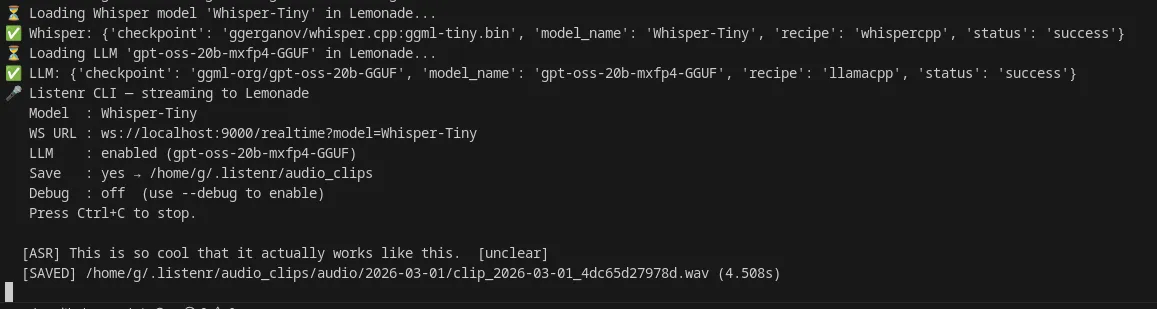
listenr recordListenr streams the microphone to Lemonade in roughly 85 ms chunks at 16 kHz. Lemonade's voice activity detection decides where speech starts and stops, runs whisper.cpp on each segment, and streams the transcript back. Listenr writes the segment as a .wav and appends one JSON object to manifest.jsonl.
That manifest is the whole data model. One object per line:
{
  "uuid": "dbee80fdf678",
  "timestamp": "2026-03-05T01:21:38.611439+00:00",
  "audio_path": "~/listenr/audio_clips/audio/2026-03-04/clip_2026-03-04_dbee80fdf678.wav",
  "raw_transcription": "I generally prefer Gemma.",
  "corrected_transcription": "I generally prefer Gemma.",
  "is_improved": false,
  "categories": ["note"],
  "whisper_model": "Whisper-Base",
  "llm_model": null,
  "duration_s": 1.878,
  "sample_rate": 16000
}
{
  "uuid": "3125bf40c882",
  "timestamp": "2026-03-04T01:21:41.081500+00:00",
  "audio_path": "~/listenr/audio_clips/audio/2026-03-04/clip_2026-03-04_3125bf40c882.wav",
  "raw_transcription": "Clode code is a tool.",
  "corrected_transcription": "Claude code is a tool.",
  "is_improved": true,
  "categories": ["command"],
  "whisper_model": "Whisper-Base",
  "llm_model": "gpt-oss-20b-mxfp4-GGUF",
  "duration_s": 0.085,
  "sample_rate": 16000
}
raw_transcription is what Whisper heard. corrected_transcription is what the LLM made of it, and it is the field fine-tuning trains against. is_improved tells you whether the LLM changed anything, which is the fastest way to audit whether the cleanup step is earning its keep. Because it is JSONL, jq and every language on the machine can read it without a library.
Three other commands feed the same manifest. listenr asr transcribes an audio file you already have. listenr retranscribe re-runs Whisper, and optionally the LLM, over clips you already saved, which is how you upgrade old labels after switching models. listenr categorize filters a manifest down to clips matching a topic using embeddings.
Build the dataset
listenr build-dataset --format hfThis reads the manifest, drops clips shorter than min_duration or thinner than min_chars, and writes 80/10/10 train/dev/test splits as a HuggingFace Arrow dataset:
~/listenr_dataset/
├── dev.csv
├── test.csv
├── train.csv
└── hf_dataset/
    ├── dataset_dict.json
    ├── train/
    ├── dev/
    └── test/
Setting format = "both" in the config gives you the CSVs alongside the Arrow files. If for no other reason, the CSVs make reading with your own eyes easy while the Arrow directory is for the trainer.
If you want to blend in outside data, listenr import-mdc <dataset-id> pulls a Mozilla Data Collective dataset and listenr import-hf <dataset-id> pulls a Hugging Face one. Both write a separate Listenr-shaped manifest that you pass to build-dataset alongside your own.
Fine-tune
podman compose run --rm finetuneThe compose file in the repo layers Listenr on AMD's tested ROCm PyTorch image and runs a LoRA fine-tune of openai/whisper-small with the encoder frozen. Extra flags append rather than replace, because the defaults live in entrypoint and not command:
podman compose run --rm finetune --max-steps 500
podman compose run --rm finetune --base-model UsefulSensors/moonshine-base
Moonshine is the cheap experiment if you want a fast loop: moonshine-tiny is 27M parameters against whisper-small's 244M. Listenr picks the right data pipeline from whichever family --base-model names, because Whisper wants a log-Mel spectrogram padded to a fixed 30 second window and Moonshine wants the raw waveform at its natural length.
What lands in ~/listenr_finetune is a LoRA adapter, not a model:
$ du -sh ~/listenr_finetune/adapter_model.safetensors
3.4M	/home/g/listenr_finetune/adapter_model.safetensors
3.4 MB, because the adapter stores only the small set of weights the training actually changed.
Merge
podman compose run --rm mergeThe adapter holds weight deltas, so on its own it needs PEFT at inference time. Merging folds the deltas back into the base weights.
Merging is pure matrix arithmetic and needs no GPU. The merge service forces HIP_VISIBLE_DEVICES=-1 on purpose, because loading the ROCm runtime segfaults during PeftModel.merge_and_unload().
Evaluate
listenr eval
# or
listenr eval --compare-base --keyword YourDomainWord
This runs the merged model over the test split, which the fine-tune never saw, and reports corpus WER against the ground truth transcriptions. With --compare-base the base model transcribes the same clips so you get a side by side. With --keyword you also get per-word recall, which is the number that actually matters when the point of the exercise was teaching the model six words it kept mangling.